OPTIMIZE YOUR FLOW
Boost your metrics with Qanty
Reduce wait times by up to 40% with our mobile solutions.
Discover the user-centric interface of the Qanty platform. This guide outlines the seamless journey your customers experience—from installation to real-time tracking—demonstrating how our mobile interface reduces friction, empowers users, and optimizes flow for high-demand sectors like Health, Government, and Banking.
Enhance your CX strategy with a mobile-first approach. This walkthrough demonstrates the simplicity of Remote Appointment Scheduling, the efficiency of Virtual Queuing, and the transparency of Real-Time Status Tracking. See how our Smart Virtual Waitlist App puts control in your customers hands.
What is the Qanty App? The Qanty App is the client-facing mobile interface of our Operational Intelligence Platform. It allows end-users to schedule appointments, join virtual queues remotely, and track their wait time in real-time, significantly reducing lobby congestion and improving the overall customer experience (CX).
Qanty is available for download on the Google Play Store for Android devices and the App Store for iPhones. Click the appropriate link for your device to download the app quickly and securely.
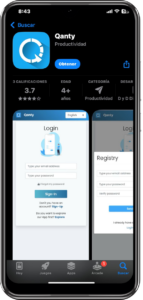
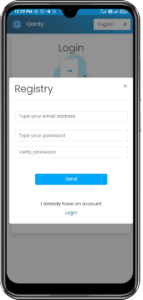
Once installed, open the app and select the Sign Up option. Fill out the form with your name, email address, and password. Hit Sign Up, and your account will be ready in just a few minutes.

Reduce wait times by up to 40% with our mobile solutions.
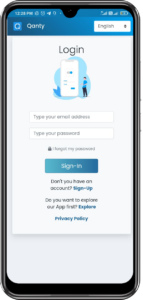
With your account created, simply enter your credentials and press the Sing-In button. You are now ready to begin!
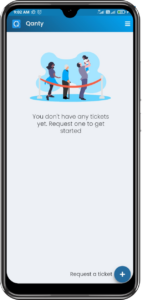
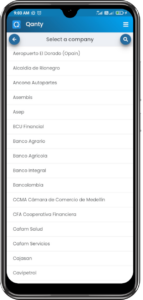
Once logged in, tap the + Request ticket button. Here, you can search for the organization where you need to schedule your visit. Use the search bar or magnifying glass for faster results.
Did you know?
Allowing customers to view branches remotely distributes the workload across your locations, naturally balancing the flow of visitors.
Choose the branch closest to you. If needed, use the location filter to find the most convenient options.
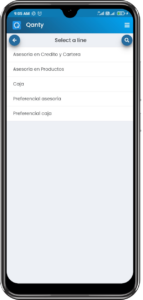
Select the service line that matches your needs. Each line has different wait times and prioritization, so choose the one that best suits your schedule.
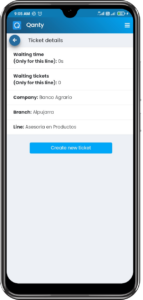
Before finalizing, review the appointment summary, which includes the entity, location, line, and estimated wait time. If everything looks good, tap Create New Appointment.
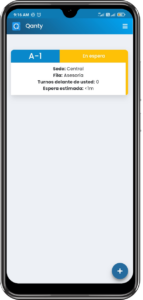
After scheduling, monitor your appointment status in real-time: Waiting, In Progress, or Completed. The app also displays the estimated wait time to keep you informed.
With the Qanty app, you will save significant time by managing appointments efficiently and avoiding unnecessary waits. Convenience is key—handle the entire process directly from your phone without needing to visit locations in person. Thanks to its user-friendly design, you can easily find entities and branches nearby, optimizing your overall experience.
Download Qanty today for Android or iPhone and start managing your appointments more effectively. Take control of your time—download the app now and simplify your life with Qanty!
“Reduce anxiety and perceived wait times by putting the queue in your customers pocket.”


Yes, the Qanty App is completely free for customers to download and use on both iOS and Android platforms to manage their appointments and queue status.
Absolutely. Qanty serves as a centralized platform, allowing you to search for and manage appointments across various entities like banks, clinics, and government offices that use our system.
Yes, Qanty syncs in real-time with the organizations queue management system (QMS), providing live updates on your position in line and estimated wait times.
By allowing remote check-in and virtual queuing, Qanty eliminates the need to physically wait in a lobby, optimizing flow and reducing congestion.
Data security is a priority at Qanty. We use enterprise-grade encryption and comply with data protection regulations to ensure your information is safe.
Give your customers the digital tools they expect. Schedule a demo today.